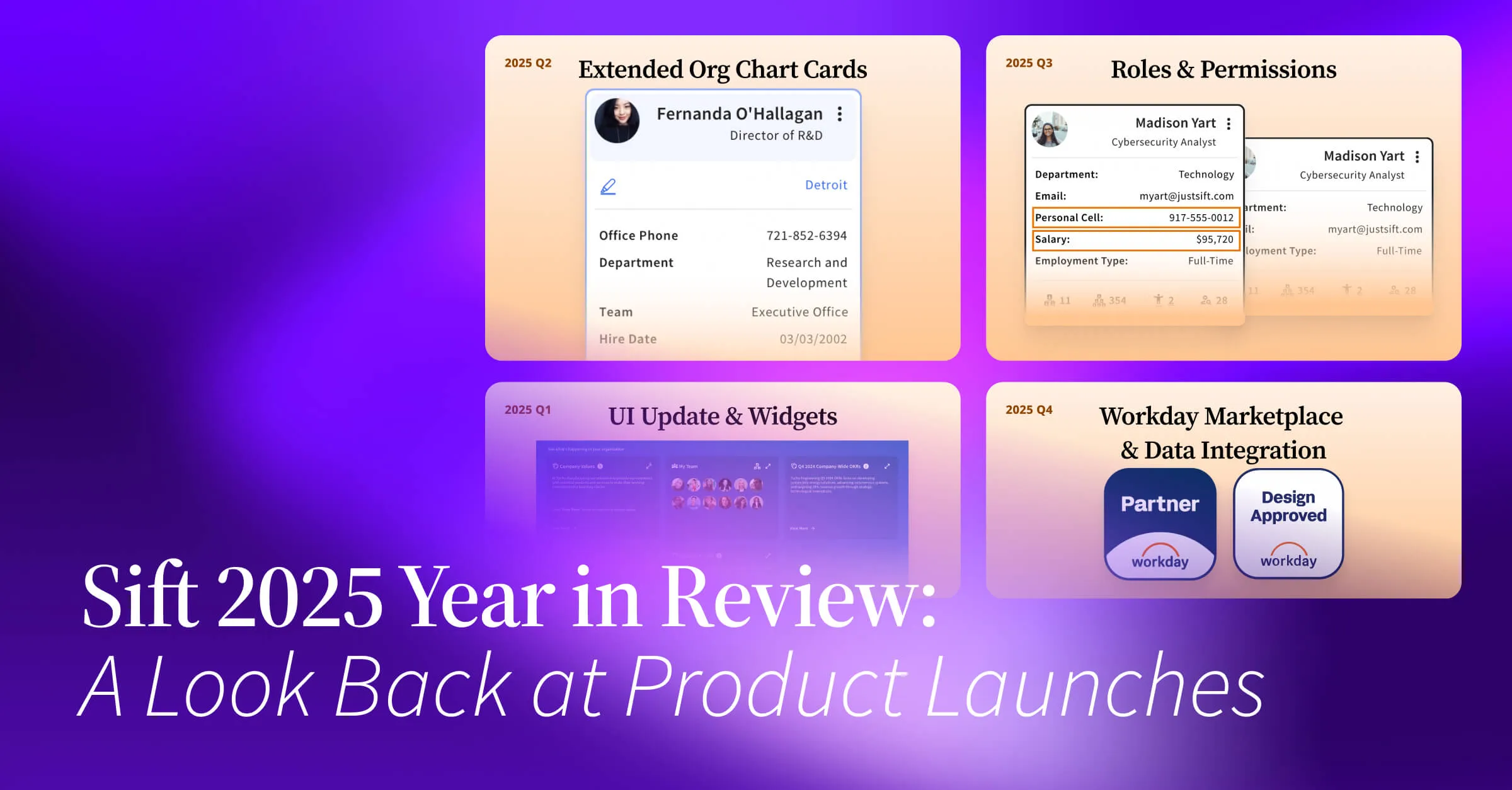
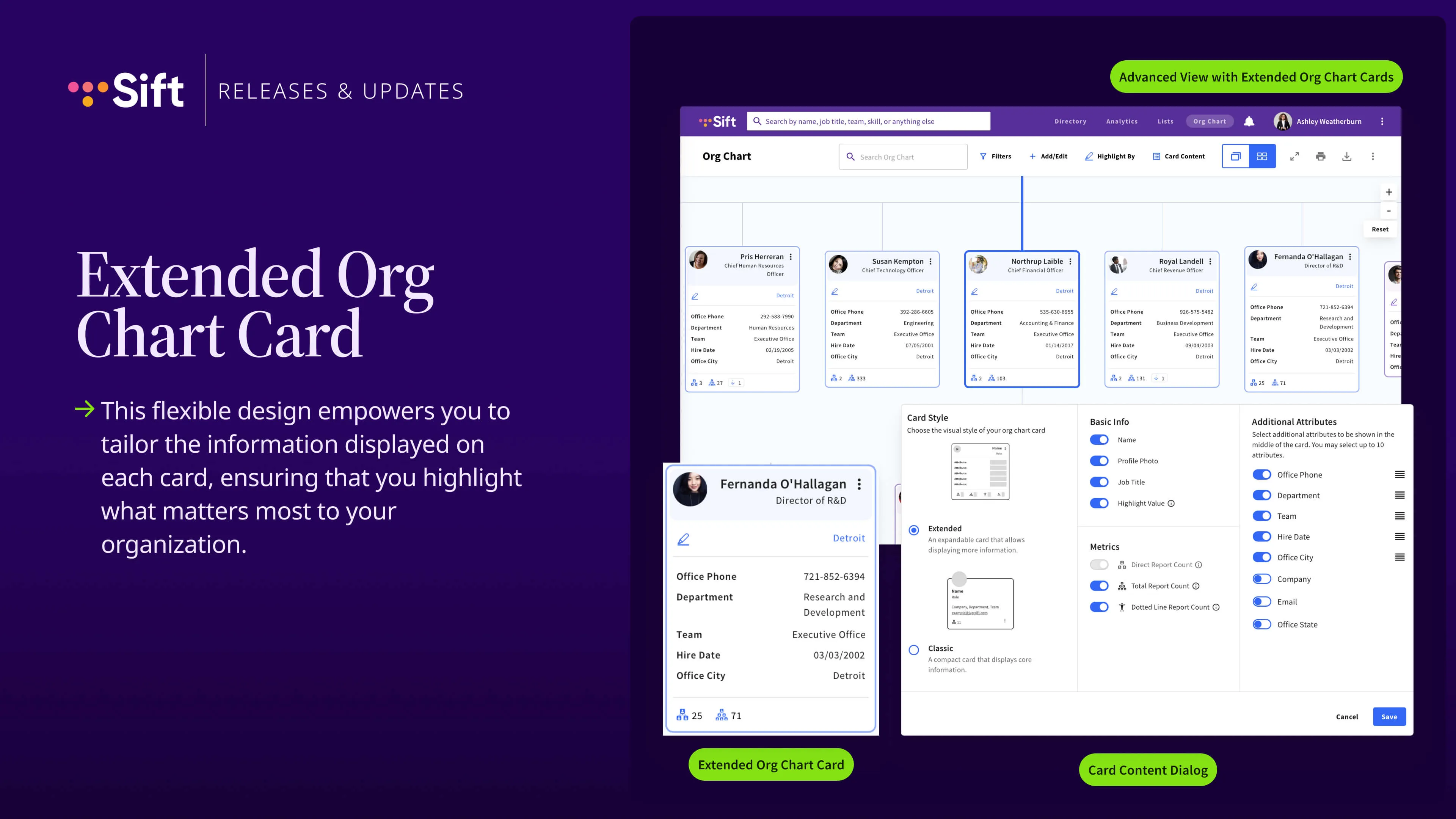
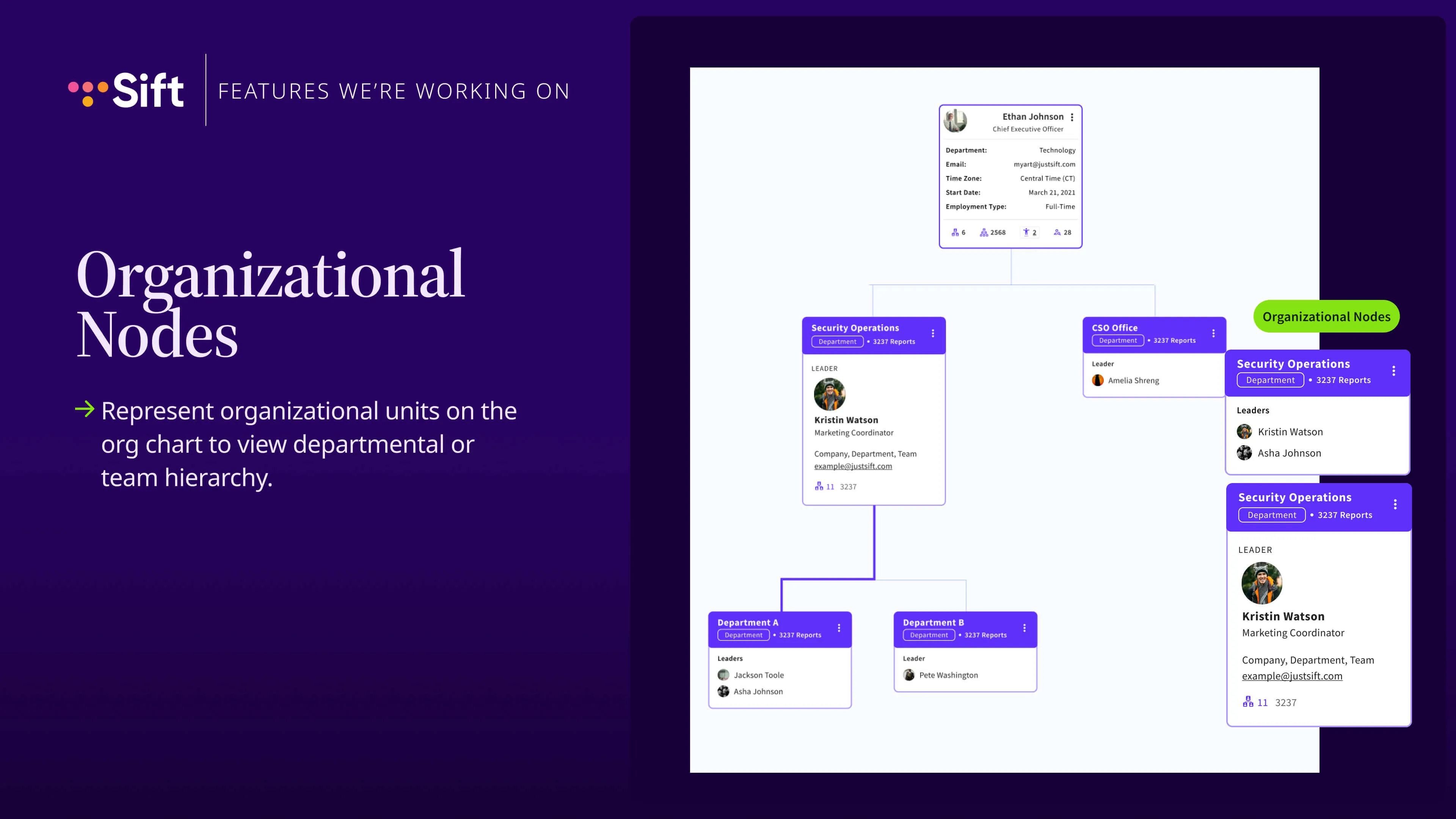
Go ahead and and get started, and we'll let we'll let people to continue to come in as as the meeting goes on. So, hi. Welcome. This is our our quarterly product webinar. If you've never been to one of these before, traditionally, we'll just kinda go over what we did in the previous quarter from a product perspective and what we're looking to do in the future on our on our road map. I'm Ryan. I'm the head of our our product team here at Sift. Always excited to get to to talk to our customers and learn more about what you're looking for in our platform. And also if you're not currently a customer, if you're here kind of looking at looking at Sift as a potential product that you're interested in or you just kind of are curious about what you're doing, welcome to all of you regardless. Always feel free to ask any questions in the chat. I'll certainly answer them right away as I'm going through the presentation. Or if you'd like to wait until the end, we will leave some time for people to stick around if they would like to answer any questions, and we will have poll questions as well. We'll send out a recording within thirty six hours of the event ending. For this specific webinar, we did decide to kind of do a look back at all of twenty twenty five rather than just the last quarter. We thought it would be good opportunities to do so. And then at the end here, we're gonna, as always, just talk a little bit about what we're working on right now. So we'll go ahead and get started with that. So the first thing we did this year was we made a large update to the homepage of Sift. So over the last year, year and a half or so, we've kind of begun to introduce these different widgets onto the homepage of your platform. So what these will do is kind of give you a more engaging homepage beyond the standard search bar. So you'll see in this example, we have the my team widget in the middle here and then all of these kind of different rich text areas that you and your company can kind of put whatever you would like in these areas. So we see people using this to link to other Internet sites or post some announcements even or anything like that. And then in addition, which isn't pictured here, we did add near the beginning of this year widgets for new hires and anniversaries. So just a way for people to see engaging content right at their homepage. And then you can also create custom lists by date. So beyond new hires and anniversaries, if you have any date based milestones people are going after, you can feature those people right on the home screen. We also did a refresh of our brand. So you may have noticed if you've been to our website recently versus in the past, we now have sort of a more mature looking brand. Sort of the point here was deepening these colors, new typeface, just to sort of uphold part of our existing style, but also sort of evolve a little bit here and and just look a little bit more mature as we kind of move into the future as well. One of our biggest things this year also was this extended org chart card. Previously in SIFT and a long time ago, you used to not be able to show many additional attributes on these cards. You could kind of only show name, job title, department team. But we now have a very flexible card, which is available under the card content menu at the top of your screen to show more information on the org chart. So any custom attribute that you're bringing into the system or any attribute that somebody's editing in the system, you can now fully show this show this on your org chart screen so people can truly use this org chart and not sort of leave and navigate back and forth. So if you're not already using this, definitely take a look at that. And then really big thing that we release as well is roles and permissions. This really gives people the ability within our platform to add more restricted information to profiles such as comp salary data, performance review data that only certain people can see. So traditionally in SIFT, it was sort of made for the transparency use case. So kind of everybody at your organization can learn about everybody that they work with. And while that's still a very powerful use case, we wanted to introduce kind of more like leadership driven use cases. So kind of being able to analyze compensation, like, on your team and your department, all of that kind of stuff. So we now do have the ability in Sift to create what we call restricted attributes. So we do have documentation on that available where you can kind of create these restricted items that only certain people can see. By default, these attributes will only sort of appear for appear for, like, a leader and the and the people below them. So for example, if I added salary to a person's profile that's restricted, like, anybody kind of above me in my leadership chain would be able to see that information. But in addition to that, we also have a very flexible system to to customize those permissions as well. And you can kind of delegate access however you would like. In addition to that, you can also kind of completely restrict view access to people in the org chart and directory at all. So for example, if you wanted people in the technology department in Sift to only see other people in the technology department and not see people outside of that department at all, you could also do that with the same sort of system. So it's pretty cool. Oh, and more. Yeah. Lots of other things. We released that last year as well. We did do as always, we focused a lot on our integrations and partnerships. So we entered the Workday partnership ecosystem by building a native integration there, and also strengthened our relationships with a lot of our other partners. We had some a lot of various, like, minor updates to our org chart with dotted line reporting, where we now explicitly show dotted line reports directly in the org charts. We added some other settings for the org charts to just, again, increase the sort of flexibility there, including being able to unaligned in the org chart, kind of sort the cards by any attribute they would like. So instead of kind of ordering people by last name, you can kind of group people by job title or anything like that. And then, this is small, but it's also meaningful. So in the past you needed everybody that you imported into Sift to have an email address to be imported, but we also sort of got rid of that restraint. So we heard a lot of customers have the use case of, hey. Like, I I wanna bring, like, all of these people into my org chart, but some of them don't have email addresses or some of them, like, don't need to log into the platform. So now you can kind of bring people in that don't have that attribute. So it's a lot more flexible to create things on the org chart. Yeah. So here's our sort of first question of the day. So in the chat, if you could give us one word to describe your biggest goal for your team in 2026. So we're kind of, at Sift, looking to align our road map with with our customers' needs. So if you feel comfortable sharing that, feel free to throw something in the chat for what you are focused on for the year. I will go ahead and skip this. Alright. No worries. We can just move on. Yeah. So what are we working on coming up here in 2026? Yeah. Something that we're about to release here in the next week or so actually is organizational nodes on the org chart. So right now our org chart is mainly built from people or actually completely built from people. So obviously you are able to see your people management hierarchy in the org chart where I can look at who leads who, etcetera, and navigate the org chart that way. But going forward, you will also be able to put organizational units on the org chart to group different parts of your org chart together. So we've heard this in the past where a company may want to represent the organizational structure of their company at like a organizational unit level, like rather than just a people level. So for example, like I might have different departments at my company, right, that I kind of wanna display on my org chart underneath my CEO and group them that way. So as you can see here in this sort of screenshot example, we have a CEO up here. And then underneath that CEO, we have a security operations department. And then underneath that department, we have a couple of different sub departments. And I also do have just a brief sort of demo for you because we do have this live in sort of one of our beta environments. But as you see here, I can kind of navigate around the org chart, I have departments here. And then underneath the departments, I have different teams that I can expand as well. And the idea of how this works today is you as a administrator would be able to kind of identify, like, who are the different leaders of these organizational units. So in this specific example, like Putnam and Pris do report directly to Loleta in this example, but we've kind of inserted these organizational units above them. So what you would do is you would tell the system, hey, the leader of the human resources department is pre. And because you told us that that was the leader of that department, we would then be able to put that organizational node on the org chart. And this is just the beginning. We're looking to extend this functionality into the future as well. We are looking to integrate this if any of you use it with our Sift Pages functionality, which is where you can kind of have profiles for things that are not people. You would be able to learn more about these departments' organizational units. But again, the idea here is really expand on our org chart functionality to allow different kind of structures beyond just the traditional people reporting hierarchy so you can represent your organization more accurately and transparently. Oops. Wrong button. From current site. Yep. Yeah. And then the next thing, just wanted to introduce you to here as well, is multiple roles. So this will allow you to put the same person in multiple spots on the org chart in, like, a hard line way. So we do currently have the dotted line reporting feature where you can kind of do this in in in some aspects where you can kind of create an informal relationship where one person exists as a dotted line. But this will let you do that in a more hardline way. So if a person, like, legitimately has more than one position where they report in two different spots in the organization and that's how your company kind of exports its data, we'll be able to support that. And then we will also add a kind of a, convenient way to kind of navigate between the multiple positions for the person. So, like, for example, if I have Danny here who's the CSO, but then they also have another role somewhere else on the org chart, we'll have, like, a little pop over that lets you kind of jump between both of that person's roles so you can navigate in between them. And then the last one I wanted to share, which I'm excited about because we get asked about it a lot, is printing by leader. So this is basically automating a page by page export per leader at your company. So we've heard the feedback a lot in the past where if a person wants to print a very large org chart in Sift, like kind of the way that that works today is we just give you a singular PDF of the entire thing, which can look excuse me, which can look large and kind of hard to parse. So what this will allow you to do is kind of say, hey. Like, I want to do an export of my org chart starting at the top, going the first three levels, and it'll kind of automatically generate you a multi page PDF of all those different people. So it's just a much easier way to kind of export and view a large amount of data at the same time. And that will also support all of our extended card content functionality. You're able to kind of choose what pieces of information that you want here and how many people that you want to print. So this is also sort of on track to be released by the end of this quarter or shortly afterwards. And that's it for our Q1. So lots org chart things that we're focused on doing as is common with Sift. But in terms of future thinking in twenty twenty six, we have a couple of things that are high on our list to investigate and put on a roadmap. One is we want to bring more tools to the platform that are useful for leaders at the company. So right now in our directory and org chart, kind of every employee at the company for the most part gets kind of an equal experience. But we're looking to kind of bring more leader specific things such as maybe organizational planning, org chart building, more complex data analysis to kind of better understand your team and your employees and your resources. The other thing that we are beginning to sort of investigate, which we would love your feedback on, is AI. So just looking to see how AI can play a role inside of Sift's product or how we can integrate into other AI products. And we had a poll question here for you. Again, this one is a nice easy multiple choice one. So hopefully, you don't mind answering this one. Are you currently feeling fatigue, or are you looking for more gendered features integrated into your workflow? Because as we all know, lots of products are integrating AI today, and some of which are kind of more of a necessity than others. But we're just curious how everybody is feeling about AI and how that's going. And I think we should be having like a pop up in Teams show up for that question. Maybe not. Alyssa, Aaron? I think we're having some technical difficulties on our side. Alright. No problem. Okay. If anybody I guess if anybody wants to answer this question in the chat, please go ahead. Any any thoughts on AI and sort of are you fatigued with it? Are you really into it? Are you using AI all the time? Any thoughts? Right. It's no prob. Oh, there we go. A little fatigue. Okay. Thank you for answering, Erika. I appreciate it. Okay. All right. Thanks. I will go ahead and wrap up here. Like it depending on the situation. Yeah. Thanks, Mary. Appreciate that as well. Yeah. And I guess if you have any thoughts as well, Mary, I know we talk sometimes over email. If you have any thoughts about like Sift specifically and how you would like to see it integrated into that workflow, feel free to send me a message. Yeah. Thank you all for joining. Always appreciate it. We we do hold these every quarter. If you are interested in giving us any other feedback, you can always contact us at product@justsift.com, which is kind of a general mailing list, or you can contact me directly at ryan@justsift.com. I always love hearing everybody's feedback. You can always follow us on LinkedIn for our latest updates. We post about all these webinars. We post about all of our product releases. We post about a lot of different things. So please give us a follow on LinkedIn. And if you have a review for Sift that you'd like to give to sort of give us the feedback on your experience, we would always love to hear it either way. Yeah. And thank you for joining. I will let you all get back to your afternoons. Definitely appreciate it. And if you have any questions, feel free to stick around and ask me anything that you need to. Thank you all. Bye. Does the multiple role feature require specific roles to be named for the user? Is anything we do with the organization does not specify a named role. Yeah. So so there's a couple different things there. So we are going to continue to have like kind of the dotted line relationship feature where in Sift, you can kind of just create a secondary role for a person. So like if I report to John and I also report to Jane over here, you can kind of create a dotted line relationship and say here is this secondary role that you're in. This other specific multiple role feature is if your system of record actually defines multiple roles for the users, which we've seen in some different HR system scenarios, that's how you would kind of do it. But I guess when you say the organization does not specify a name role, you kind of trying to say in your official data source, it doesn't actually say that this person has multiple roles, but in reality they do? Like, in that case, you you will still be able to, like, create that relationship and sift itself, and we can send you some documentation on how to do that. That's correct. No official over there for you. Specified evidence limited to why I work with them. Got it. Got it. Got it. Yes. So you're looking to kind of create more context around the dotted line relationship. I get I get what you're saying. So kind of an alternate description for the role where they're truly in multiple roles and you wanna describe that. Okay. Got it. No, that's good feedback. I'll take that away. Thank you. Yeah. So with this feature, not exactly, but I can try to find a workaround for you. But yes, appreciate that feedback. Awesome. Yeah. If there's nothing else, again, thank you all for joining, and I will see you all next time. Goodbye.